













-
 Lifetime Warranty
-
 30-Day Money-back Guarantee
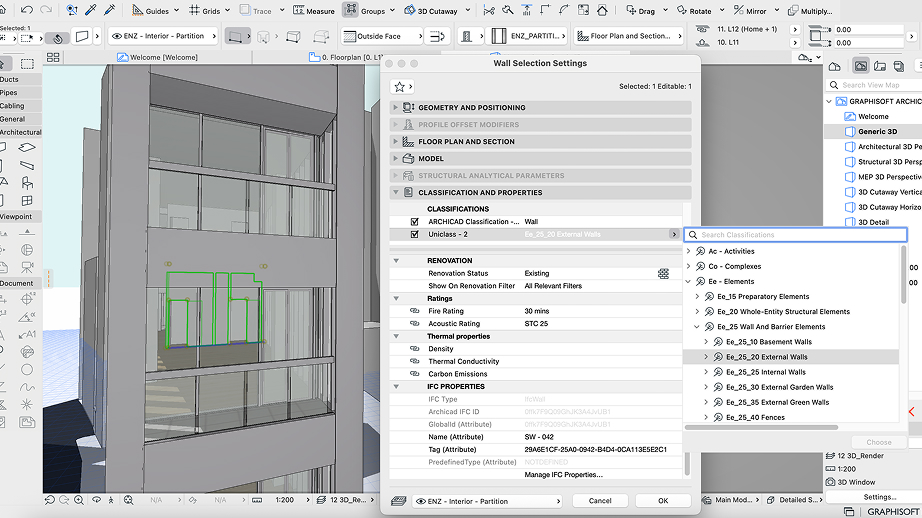
Graphisoft Archicad 29 Student Version is a powerful Building Information Modeling (BIM) software designed for students, educators, and academic institutions in the field of architecture and construction. This educational edition includes all the features and functionality of the commercial version, enabling users to design, model, and document architectural projects with professional-grade tools.
Note: This is an educational license intended strictly for non-commercial use. A watermark indicating the educational license type will appear on printed and exported documents.
With Archicad 29, students can gain hands-on experience using industry-standard BIM technology, preparing them for real-world architectural workflows.
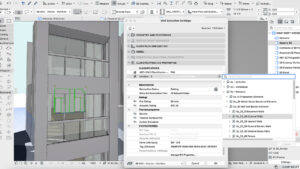
Archicad 29 Student
🏗️ Archicad 29 Overview
Developed by Graphisoft, a global leader in BIM solutions, Archicad enables users to create detailed 3D building models while integrating all project data into a single, intelligent environment. From conceptual design to construction documentation, Archicad streamlines the architectural workflow, enhancing productivity and collaboration.
✅ Key Product Details
- ✔️ Genuine Educational License for Archicad 29
- ✔️ Full Feature Access identical to the commercial version
- ✔️ Official Software Download from Graphisoft’s website
- ✔️ Non-Commercial Use Only with educational watermark
- ✔️ Instant Digital Delivery via email
- ✔️ Free Technical Support available 7 days a week
🚀 What’s New in Archicad 29
Archicad 29 introduces a more intelligent, streamlined, and high-performance BIM environment, enhancing everyday workflows for modern architectural teams.
🔹 Advanced BIM Enhancements
- More precise modeling tools.
- Improved project data management for better coordination and accuracy.
🔹 New Automation Tools
- Reduces repetitive tasks.
- Accelerates the creation of architectural elements and documentation.
🔹 Optimized 3D Performance
- Faster rendering times.
- Smoother navigation within large and complex models.
🔹 Improved Energy Analysis
- More accurate building performance calculations.
- Faster simulation results for sustainable design.
🔹 Enhanced Interoperability
- Improved IFC exchange for better collaboration with other BIM platforms.
- Stronger integration with BIM collaboration tools.
🔹 Modernized User Interface
- Intuitive menus and simplified command workflows.
- Enhanced usability for both beginners and advanced users.
🔹 Upgraded Collaboration Tools
- Easier design reviews.
- Improved communication among project stakeholders.
These innovations make Archicad 29 an excellent choice for students seeking efficiency, precision, and a modern BIM design experience.
🎨 Rendering Solutions for Archicad 29
🌆 Lumion Integration
Lumion integrates seamlessly with Archicad through LiveSync, enabling real-time visualization and high-quality rendering. Its extensive library of materials and objects, along with AI-enhanced lighting, allows users to create immersive architectural presentations quickly.
🧱 Substance Collection
The Substance Collection enhances rendering by providing high-quality PBR materials compatible with V-Ray, Twinmotion, and Unreal Engine, resulting in realistic textures and visually compelling architectural scenes.
🏆 Benefits of Using Archicad 29 for Students
- 🎓 Industry-Standard BIM Software – Prepare for professional architectural careers.
- 🏗️ Comprehensive Design Tools – From concept to construction documentation.
- 🤝 Collaborative Workflow – Seamless teamwork with BIM platforms.
- 🌱 Sustainable Design – Advanced energy analysis for eco-friendly projects.
- ⚡ High Performance – Efficient handling of complex and large-scale models.
- 🎨 Realistic Visualization – Integration with leading rendering solutions.
⭐ Why Choose Licensedealshub.com?
Purchasing your Graphisoft Archicad 29 – Student Version from Licensedealshub.com ensures a secure and reliable experience:
- ✅ 100% Genuine Licenses – Authentic software sourced from official channels.
- ⚡ Instant Digital Delivery – Receive your activation details immediately after purchase.
- 💰 Competitive Pricing – Affordable solutions for students and educators.
- 🛠️ Expert Customer Support – Multilingual assistance available 7 days a week.
- 🔒 Secure Payment Methods – Safe transactions through trusted gateways.
- 🌍 Worldwide Availability – Accessible from anywhere in the world.
- 🔄 Customer Satisfaction Guarantee – Prompt assistance or replacement if needed.
📥 How to Get Your Archicad 29 in 3 Easy Steps
- Purchase the License
Complete your order on Licensedealshub.com. - Download the Software
Access the official Graphisoft website to download Archicad 29. - Install and Activate
Install the software and activate it using the license details provided via email.
❓ Frequently Asked Questions (FAQs)
1. What is the difference between the student and commercial versions?
The student version includes all the features of the commercial edition but is restricted to non-commercial use and adds a watermark to printed or exported documents.
2. Who is eligible for the student license?
Students, educators, and academic institutions involved in architecture or related fields are eligible for this educational license.
3. How will I receive my license key?
After completing your purchase, the activation details are sent instantly via email.
4. Can I use this version for professional or commercial projects?
No. The student version is strictly for educational and non-commercial purposes.
5. Where can I download Archicad 29?
You can download the software directly from the official Graphisoft website, ensuring authenticity and security.
6. Is technical support available?
Yes. Licensedealshub.com provides free technical support 7 days a week to assist with installation and activation.
7. What should I do if I cannot activate my subscription?
If you encounter any activation issues, simply contact our support team with details and screenshots, and we will promptly assist you.
8. Is this license valid worldwide?
Yes. The Global educational license can be activated from anywhere in the world.
9. What operating systems are supported?
Archicad 29 is compatible with Windows and macOS, ensuring flexibility for students using different platforms.
10. Can I upgrade to a commercial license later?
Yes. Students can transition to a commercial license through Graphisoft once they begin professional practice.
Archicad 29 Student, Archicad 29 Student, Archicad 29 Student, Archicad 29 Student, Archicad 29 Student
 Overview
In The same category
Adobe Creative Cloud – All apps
In stock
Adobe Photography Plan – 1TB Cloud Storage
In stock
Autodesk AutoCAD 2023–2026
In stock
CorelDRAW Essentials 2021 – Graphic Design & Illustration Software
In stock
CorelDRAW Graphics Suite 2025 – Lifetime License (Mac Only)
In stock
Reviews
Clear filtersThere are no reviews yet.